

by Rick & Venita Lake
photos by Venita Lake
In early March, we left St. Louis with its chilly weather and our home plumbing problems to spend four busy days in the San Jose/San Francisco area operating on several very different model railroads as part of the second BayRails event. While we are both avid operations fans, we don’t get enough opportunities to operate on different railroads at home and this was a chance to see what others are doing and to visit with old friends. Following are some of our observations on things we learned about providing a great operating session for regulars and especially for “boomers,” or first-time guests. Many of them have been or will be incorporated in our own home layout and forthcoming operating sessions.
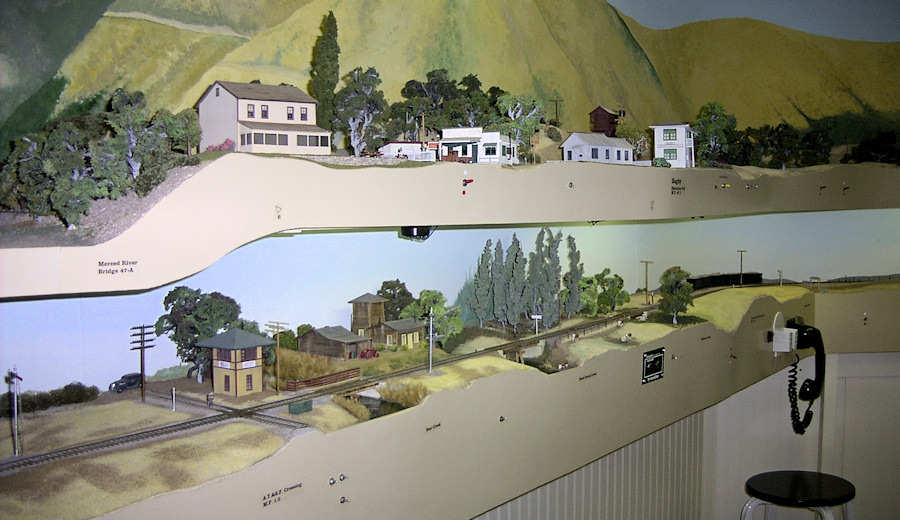
Jack Burgess’s Yosemite Valley’s double deck fascias show place names and local switch controls and provide controller plug-ins and holders plus phones to contact the dispatcher.
Plan an introductory session (about a half hour) to explain the general scheme of the railroad and its methods of operation to first-time guests. This should include information on the railroad(s), whether prototypical or freelanced, the kinds of traffic, available jobs, the physical operating system and use of controllers (also called cabs or throttles), use of switch lists or car cards, dispatching, time tables, train orders, and anything else unique to the layout. The BayRails website provided layout descriptions with much of this information so that participants could rank preferred layouts when they registered. Most had links to owner’s websites with photos and after layout assignments were determined by the committee, some owners sent additional advance information to their assigned crews. Bill Kaufman even gave us a 15-minute PowerPoint presentation on the State Belt Railroad before we started! (His article on modeling the State Belt appears in the April 2007 issue of Railroad Model Craftsman.)
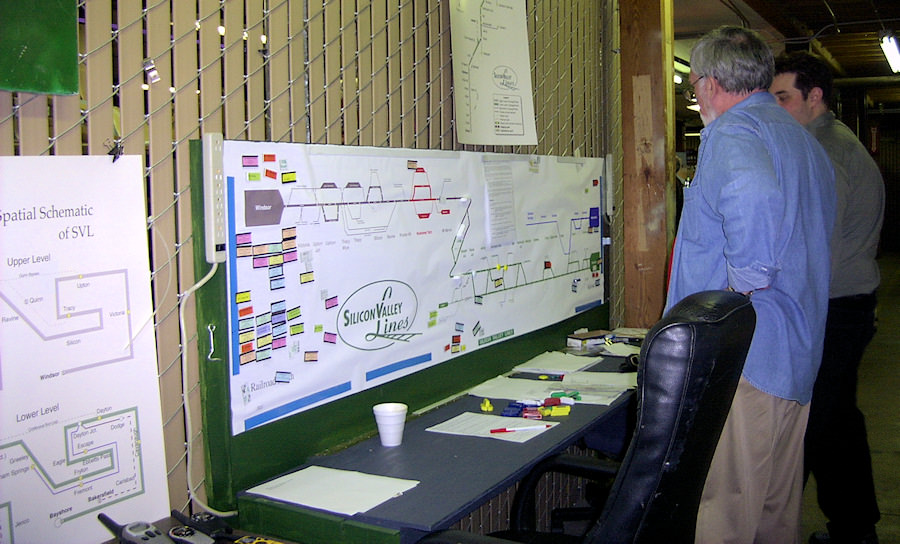
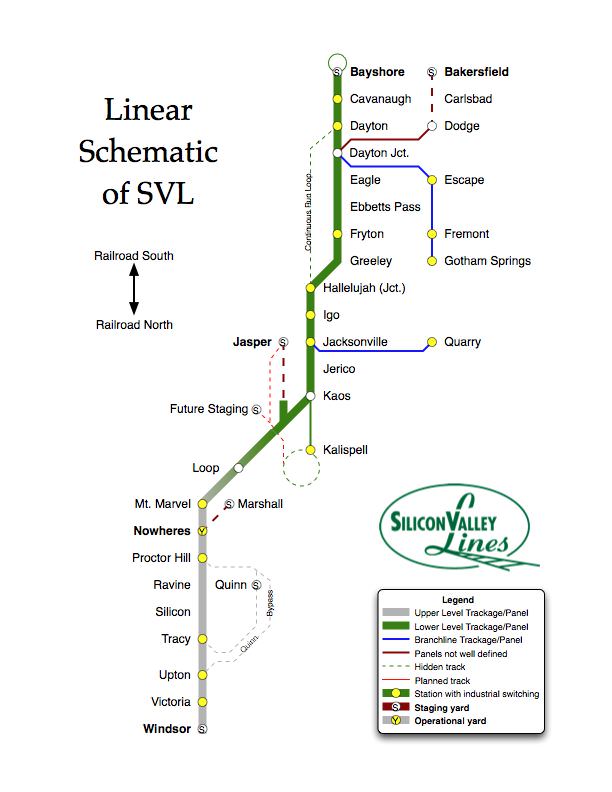
The Silicon Valley dispatcher’s desk and magnetic board with a linear schematic and, on the left, a track diagram of each level.
Identify, label, point out, and print out cities, towns, and other important locations on the layout. A walk-around tour helps beginners as well. A schematic drawing and a linear diagram are both helpful. One layout simply laminated a list of the towns in order to a small clipboard. Another small layout put the basic track plan on a clipboard. This helps to know how far ahead your next assignment, drop off or pick up, is. The Silicon Valley Line, a very large freelanced club layout, is not restricted by actual place names, so they have opted to name their towns in alphabetical order along the route, starting with Bakersfield at the south end yards and ending with Windsor at the north. Provide basic instructions for each job. Some operators prefer certain types of jobs: passenger trains, over the-road freights, yard switching, dispatcher. With experienced operators, it may be best to simply assign whichever train comes up next. Regardless, instructions that give the train number, nickname if there is one, engine and caboose numbers, engine DCC address, and a brief summary of the assigned job will start the operator off with confidence.
Give some consideration to how much the operator will have to juggle and where he or she will be working. Several layout owners provided shop aprons with pockets in addition to the usual boxes for pencils and uncoupling picks. If you are using radios and controllers, clip boards, switch lists or car cards, special landing surfaces are important or your precious trackwork and scenery may be the only option. Pockets on the fascia for controllers are very useful. Some owners use pieces of Velcro on the fascia and the back of controllers and clip boards. One very elaborate layout had just acquired multiple button telephones to contact the dispatcher, a neat addition, but had not had time to install all of them within easy reach. Since the phones were on the floor, track warrants dictated by the dispatcher were written down while sitting or squatting on the floor.
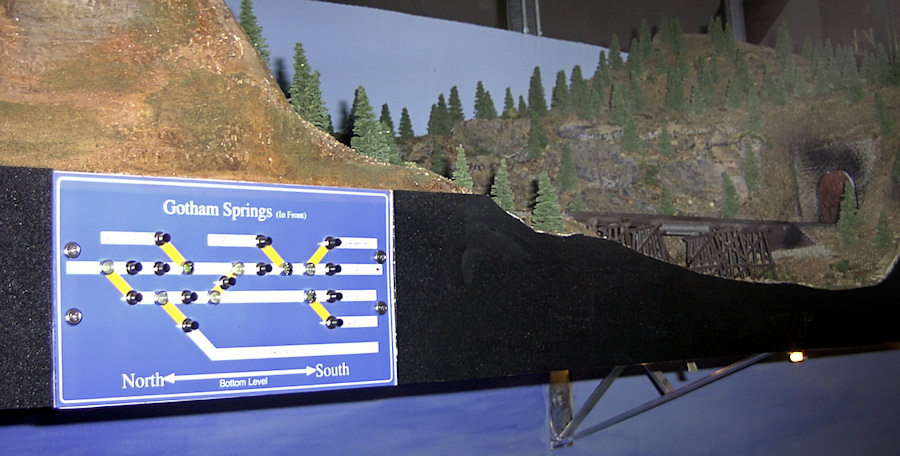
The Silicon Valley’s upper deck fascia board has place names, north/south direction indicators, and a track schematic with lighted turnout controls.
Use the fascia for providing information to visitors and operators as well as locating switch controls and indicator lights. The Silicon Valley uses the fascia on the upper deck to provide information and controls for the lower deck. It is closer to eye level and buttons or toggles are less likely to be accidentally hit. Color coding, green for lower deck and purple for upper deck, and up and down arrows helped in identification. Directional arrows for north/south or east/west serve to remind operators of which direction they are headed, important in determining who has the right of way. On single deck layouts, powered turnout throws were recessed in “portholes” on the fascia. Elsewhere, boxes for car cards were installed into or under the bottom of the fascia so that they did not project into the aisles.
 Use switch lists to simplify car movements for the engineer/conductor, especially for first-timers. Of the five layouts we visited, none used car cards for the operators. Some used switch lists generated by computer programs. Dave Parks’ Western Maryland used switch lists plus a dispatcher who issued track warrants allowing the train to proceed to a particular location on the line. Some were more concerned about reporting location to the dispatcher than others, and as dispatcher on one layout, Rick was especially interested in knowing where all 17 operators were. That layout used radios.
On the three smaller layouts we worked, some of the jobs were more isolated. Venita worked a yard on Jim Diaz’s railroad for most of the morning with almost no contact with the other three operators. Jim Burgess’s Yosemite Valley uses switch lists and time tables with bold face type indicating train meets like the prototype railroads do. It operates on an 8-to-1 fast clock with the time displayed on the NCE ProCab. Bill Kaufman has taken a cue from Chuck Hitchcock and keeps his car cards at the clerk’s desk, writing up switch lists for the engineers/conductors as cars are delivered from various destinations including the car float. Even though these three layouts had only four operators plus the owners, they were very enjoyable. You don’t need a huge layout to be able to have good operating sessions.
While many of these notes describe things that modelers in the Gateway Division are using, it was great fun to observe others. It certainly gave each of us some ideas for improving future operating sessions on the El and El. Both of us feel much more confident about dispatching our own railroad after BayRails and have a number of ideas to adapt/implement to make El and El operations more fun for everyone.
Oh, and one more thing — they had step stools or platforms where needed.


